

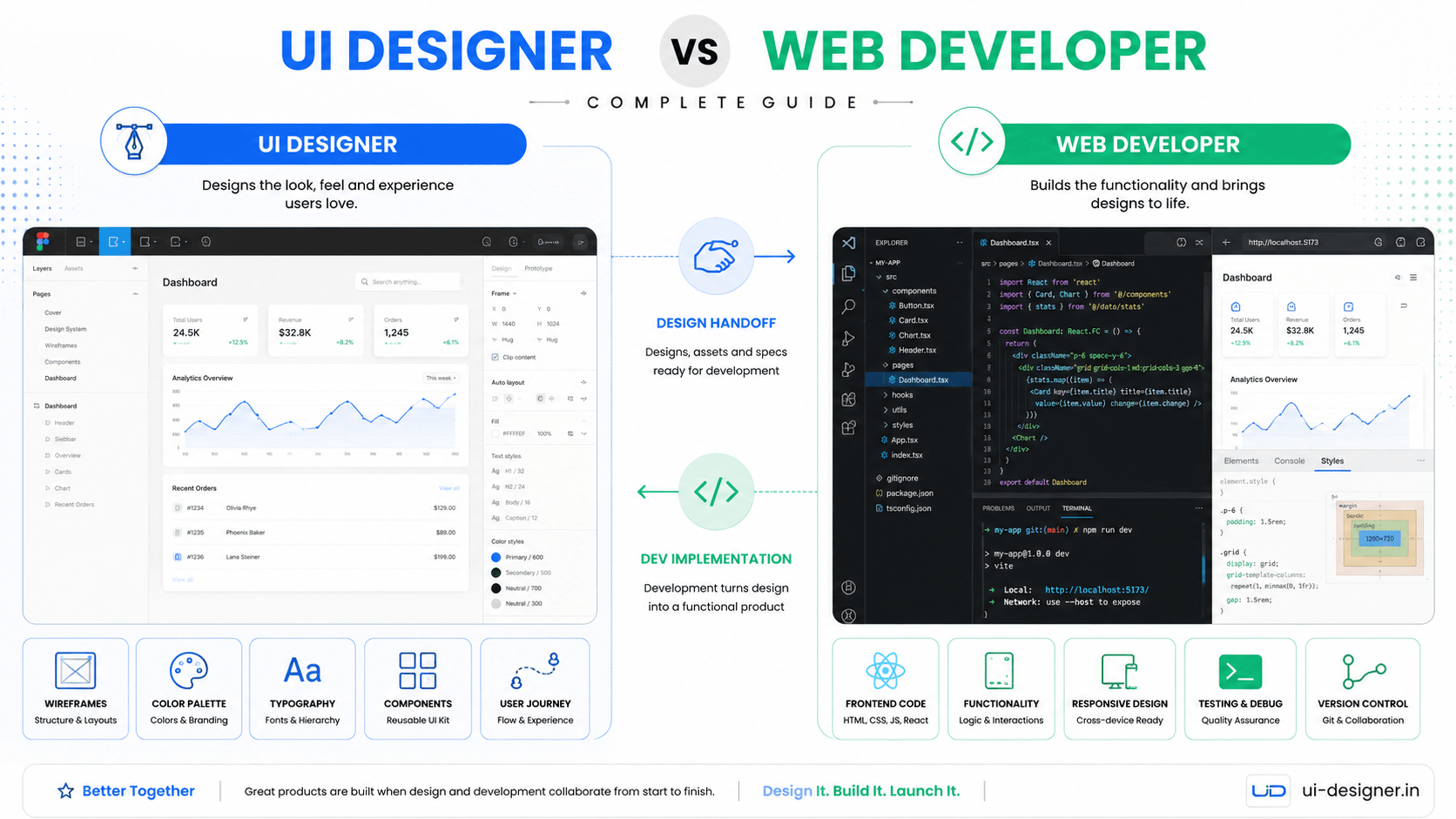
Building a business website is one of the most important investments a company can make. Yet one of the most common questions founders and marketing leaders ask is whether they need a UI Designer, a Web Developer, or both. The answer changes depending on your project stage, budget, and what you already have in place. This guide breaks down the real differences, when to hire each role, and how to avoid the costly mistake of hiring the wrong specialist for the job.
The Core Difference in One Sentence
A UI Designer decides how the website looks, feels, and behaves for the user. A Web Developer builds the functioning website that runs in the browser and connects to databases, APIs, and business logic.
That distinction sounds simple, but the overlap is where confusion and budget waste happen.
UI Designer: The Architect of User Experience
A UI Designer focuses on the visual and interaction layer. Their deliverables are typically Figma files, design systems, prototypes, and detailed specifications that developers use as a blueprint.
What a UI Designer Actually Does
- **User research and journey mapping** — Understanding who the users are, what they need, and how they move through the site
- **Information architecture** — Organizing content so users find what they need without friction
- **Wireframing and prototyping** — Low-fidelity layouts that validate structure before visual polish
- **Visual design** — Typography, color systems, spacing, iconography, and brand expression
- **Interaction design** — Micro-interactions, hover states, transitions, and responsive behavior
- **Design systems** — Reusable component libraries, tokens, and documentation for consistency
- **Usability testing** — Validating designs with real users before development starts
- **Developer handoff** — Annotated specs, asset exports, and collaboration during implementation
When You Need a UI Designer
- You are starting from scratch and need a cohesive visual identity
- Your current website looks outdated, inconsistent, or amateurish
- Users struggle to complete key tasks (high bounce, low conversion)
- You are rebuilding or rebranding and need strategic design direction
- You have developers but no design guidance, resulting in "developer design"
What a UI Designer Does Not Do
- Write production frontend code (HTML, CSS, JavaScript, React, Vue)
- Build backend functionality, databases, or APIs
- Set up hosting, CI/CD, or deployment pipelines
- Integrate third-party services (payment gateways, CRMs, analytics)
- Handle CMS configuration beyond content structure advice
Web Developer: The Engineer Who Builds It
A Web Developer takes designs and requirements and turns them into a working website. The role spans a spectrum from pure frontend to full-stack.
What a Web Developer Actually Does
**Frontend Development:**
- Semantic HTML, modern CSS, and vanilla JavaScript or frameworks (React, Vue, Angular, Next.js, Nuxt)
- Responsive implementation across breakpoints
- Accessibility (WCAG compliance, semantic markup, keyboard navigation)
- Performance optimization (Core Web Vitals, lazy loading, code splitting)
- Cross-browser testing and bug fixes
- Animation and interaction implementation
**Backend Development (if full-stack):**
- Server-side logic (Node.js, Python, PHP, Go, etc.)
- Database design and queries (SQL, NoSQL)
- API design and integration (REST, GraphQL)
- Authentication, authorization, and security
- CMS setup and customization (WordPress, Strapi, Contentful, Sanity)
- E-commerce functionality (cart, checkout, payments, orders)
- Deployment, hosting, and DevOps basics
When You Need a Web Developer
- You have approved designs (Figma, Sketch, Adobe XD) ready for implementation
- You need a functional website with forms, user accounts, or dynamic content
- You need CMS integration so your team can manage content
- You need e-commerce, booking systems, or web applications
- You need API integrations with third-party services
- You have an existing site that needs technical fixes, speed improvements, or new features
What a Web Developer Does Not Do (Unless They Also Have Design Skills)
- Create original visual designs from scratch
- Conduct user research or usability testing
- Define brand identity, color systems, or typography scales
- Design conversion-focused landing pages without a design brief
- Make strategic UX decisions about information architecture
The Dangerous Middle Ground: "I'll Just Hire One Person"
Many businesses try to save money by hiring a single person who claims to do both design and development. This can work for very simple projects, but it carries real risks:
**Risks of a Hybrid Hire:**
- **Design quality suffers** — Developers often lack deep expertise in visual hierarchy, typography, color theory, and conversion psychology
- **Code quality suffers** — Designers who code may write fragile, unmaintainable frontend code
- **No peer review** — Design and development review each other. One person cannot effectively critique their own work
- **Scalability issues** — As the project grows, the hybrid becomes a bottleneck
**When a Hybrid Can Work:**
- Simple marketing sites (5–10 pages) with standard layouts
- Landing pages for campaigns with clear briefs
- MVPs where speed matters more than polish
- Projects using mature design systems (e.g., Material UI, Tailwind UI) where design decisions are pre-made
The Ideal Team Structure by Project Type
| Project Type | Recommended Team | |--------------|------------------| | Simple brochure site (5–10 pages) | 1 UI Designer + 1 Frontend Developer (or skilled hybrid) | | Marketing site with CMS | 1 UI Designer + 1 Frontend Developer + 1 Backend/CMS Developer | | E-commerce store | 1 UI Designer + 1 Frontend Developer + 1 Backend Developer | | SaaS / Web Application | 1 UI/UX Designer + 2–3 Frontend Developers + 2+ Backend Developers | | Enterprise redesign | 1 Senior UI Designer + 1 UX Researcher + 2 Frontend Devs + Backend Team | | Landing page campaign | 1 UI Designer + 1 Frontend Developer (fast turnaround) |
How UI Designer and Web Developer Collaborate
The best results come when design and development work together from day one, not in a waterfall figma-to-production-handoff-guide-2026" class="internal-link">handoff.
Collaborative Workflow That Works
- **Discovery together** — Both roles join stakeholder interviews and requirement gathering
- **Technical feasibility during design** — Developer reviews early wireframes for complexity flags
- **Design system alignment** — Agree on component library, tokens, and naming conventions before high-fidelity design
- **Prototype review** — Developer validates interactive prototype for implementation feasibility
- **Component-driven development** — Designers create Figma components that map 1:1 to code components
- **Continuous handoff** — Tools like Figma DevMode, Storybook, or Zeroheight keep specs in sync
- **QA collaboration** — Designer reviews implemented pages against designs; developer flags edge cases
Red Flags in Collaboration
- Designer throws Figma link over the wall with no walkthrough
- Developer starts coding before designs are approved
- No shared design system — every page is custom
- Designer never sees the live implementation until launch
- Changes requested in QA that require redesign (should have been caught in prototype)
Cost Comparison: What You Actually Pay For
| Role | Typical Hourly Rate (INR) | Typical Hourly Rate (USD) | What You Get | |------|---------------------------|---------------------------|--------------| | Junior UI Designer | ₹1,500–3,000 | $20–40 | Basic layouts, component styling | | Senior UI Designer | ₹4,000–8,000 | $50–100 | Strategy, design systems, complex UX | | Junior Frontend Dev | ₹1,500–3,500 | $20–45 | HTML/CSS/JS implementation | | Senior Frontend Dev | ₹4,000–9,000 | $50–110 | Architecture, performance, wcag-2026" class="internal-link">accessibility | | Full-Stack Developer | ₹4,500–12,000 | $55–150 | End-to-end features, backend + frontend | | UI Designer + Frontend Dev (agency) | Project-based | Project-based | Coordinated team, shared process, accountability |
**Typical Project Ranges (India-based agencies):**
- 5-page marketing site: ₹1.5–4 lakh ($1,800–5,000)
- 20-page marketing site with CMS: ₹4–10 lakh ($5,000–12,000)
- E-commerce (50+ products): ₹8–25 lakh ($10,000–30,000)
- SaaS MVP: ₹15–50 lakh ($18,000–60,000)
Decision Framework: Which Do You Need Right Now?
Answer these questions to clarify your next hire:
- **Do you have a Figma/Sketch file with approved designs for every page?**
- Yes → You need a Web Developer
- No → You need a UI Designer (or Designer + Developer)
- **Does your project need user accounts, payments, or dynamic data?**
- Yes → You need a Web Developer (likely full-stack)
- No → Frontend Developer may suffice
- **Is your current site visually embarrassing or confusing users?**
- Yes → Start with a UI Designer
- No → You may only need development
- **Do you have an in-house designer but no developer?**
- Hire a Web Developer
- **Do you have an in-house developer but no designer?**
- Hire a UI Designer
- **Are you building a web application (SaaS, dashboard, marketplace)?**
- You need both, plus backend developers
The UI Designer Advantage: Design + Development Under One Roof
At UI Designer, we structure engagements so design and development are not separate vendors. Our team includes senior UI Designers and Frontend Developers who work together daily. This means:
- **No handoff friction** — Designers and developers share a Slack channel, not a PDF
- **Design system fidelity** — What you see in Figma is what ships in code
- **Faster iteration** — Design changes during development take hours, not days
- **Single point of accountability** — One contract, one timeline, one team
Final Checklist Before You Hire
- [ ] Define project scope: pages, features, integrations, CMS needs
- [ ] Audit what you already have: designs, brand guidelines, existing codebase
- [ ] Write a clear brief with success metrics (conversion rate, enquiries, speed)
- [ ] Review portfolios for relevant work, not just pretty pictures
- [ ] Ask for references from similar projects
- [ ] Clarify ownership of design files and code
- [ ] Agree on revision rounds, timeline, and post-launch support
- [ ] Ensure the team includes both design and development expertise (or hire two specialists)
Next Steps
If you're unsure where to start, book a free 30-minute strategy call with UI Designer. We'll review your current website, understand your goals, and recommend the right approach — whether that's design-first, development-first, or a combined engagement. No pressure, just honest guidance.
Your website is your hardest-working employee. Make sure it's built by people who understand both the art and the engineering.