

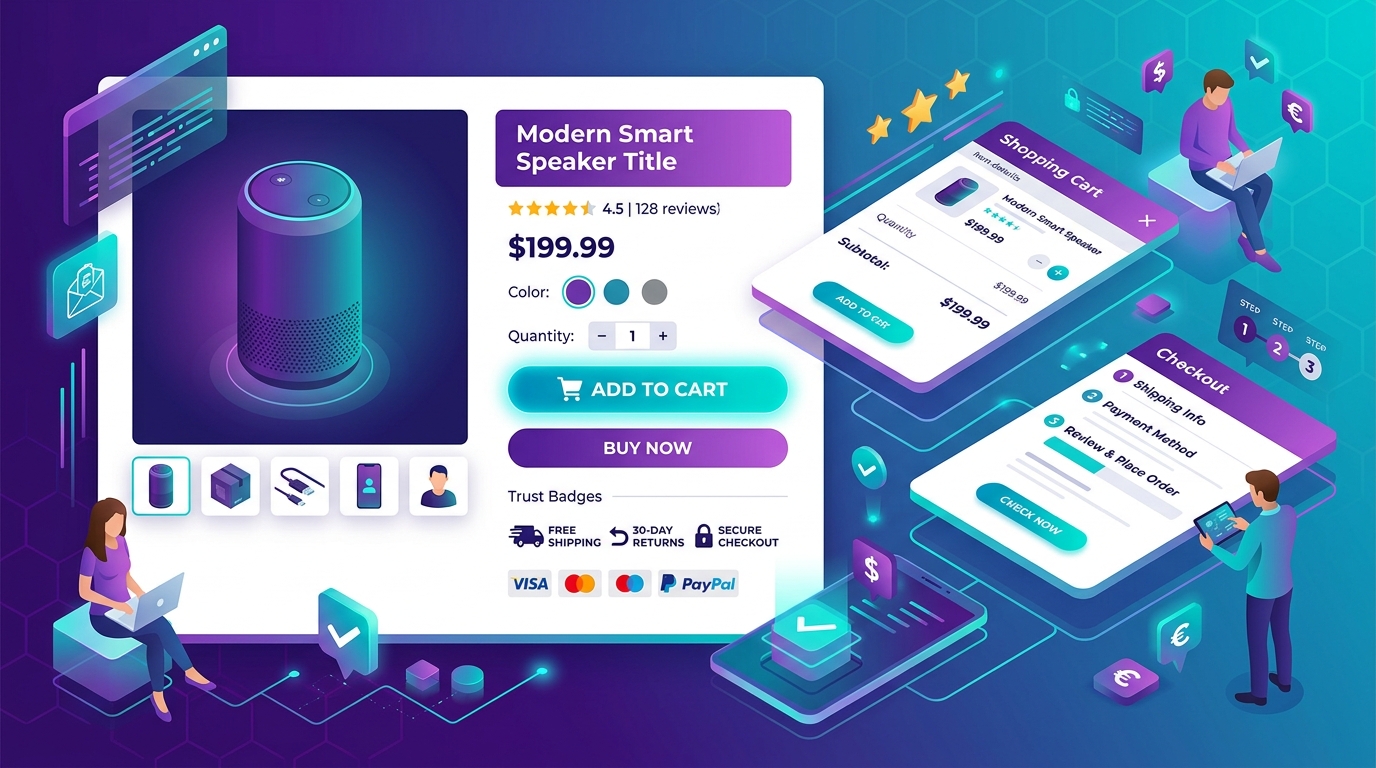
E-commerce design is not about making products look pretty. It's about removing every possible friction between "I want this" and "Order confirmed." The best e-commerce sites feel invisible — the user barely notices the interface because it just works.
This guide covers the conversion-focused UX patterns that actually move revenue, backed by patterns we've validated across 20+ e-commerce projects at UI Designer.
The Revenue Equation
**Revenue = Traffic × Conversion Rate × Average Order Value × Repeat Purchase Rate**
Design impacts three of four variables directly. This guide focuses on **Conversion Rate** and **AOV** — where design ROI is highest.
Phase 1: Pre-Purchase — Getting Them to the Product
1. Homepage: The 3-Second Value Proposition
Users decide in 3 seconds if they're in the right place.
- **Above the fold**: Clear headline (what you sell), subheadline (for whom), primary CTA (Shop Now / View Collection)
- **Trust signals**: "10,000+ happy customers," "Free shipping over ₹999," "Easy 30-day returns" — icons + text
- **Category entry points**: Visual category cards (not text links) — image, name, product count
- **Social proof strip**: Rotating customer photos with 5-star reviews, UGC Instagram feed
- **Avoid**: Sliders/carousels (1% interaction rate), generic "Welcome to our store" headlines
2. Navigation & Mega Menu: Findability = Conversion
- **Mega menu** for 10+ categories: Column per top-level category, featured subcategories, promotional banner
- **Sticky header** on scroll: Logo, search, cart, account — always accessible
- **Search prominence**: Header search bar (not icon-only), autocomplete with product images, prices, "View all results"
- **Mobile**: Bottom sheet navigation, search fixed at top, hamburger for secondary links
- **Faceted navigation** on category pages: Price, color, size, brand, rating, in-stock — with multi-select
3. Category / Listing Pages: The Comparison Engine
- **Default sort**: "Relevance" (not "Newest" or "Price low to high")
- **Filter sidebar** (desktop) / bottom sheet (mobile): Collapsible sections, show counts, "Clear all"
- **Product card**: Image (1:1 or 4:5), name, price (strikethrough if sale), rating stars, "Quick Add" button, wishlist heart
- **Infinite scroll** with "Load more" fallback (SEO-friendly) or pagination with "View all"
- **Sticky filters** on mobile: Floating "Filters (3)" button showing active count
- **Empty states**: "No products match" → suggest clearing filters, show related categories
4. Search Results: The Highest-Intent Page
Searchers convert 2–3x higher than browsers.
- **Autocomplete**: Product suggestions with image, price, category — keyboard navigable
- **Results page**: Same layout as category, plus "Did you mean?" for typos
- **No results**: Smart suggestions ("Showing results for..."), popular searches, contact support
- **Synonyms & redirects**: "trainers" → "sneakers", "mobile" → "phone" — configure in search engine
Phase 2: Product Page — The Conversion Moment
The conversion-ux-patterns" class="internal-link">product page is where the sale happens. Every element must answer a buyer question or remove a doubt.
5. Product Gallery: See It Like You're Holding It
- **Main image**: High-res, zoom on hover/click, full-screen lightbox on mobile
- **Thumbnails**: 5–8 images showing: hero, angles, details, lifestyle, scale reference, video thumbnail
- **Video**: 15–30s product demo, auto-play muted, plays inline
- **360° view** / AR: For high-consideration products (furniture, jewelry, electronics)
- **User-generated photos**: "See how customers style this" — pulls from reviews/Instagram
6. Product Information Hierarchy
**Above the fold (mobile) / Left column (desktop):**
- **Breadcrumb** (Home > Category > Product)
- **Product name** (H1, includes key spec: "Nike Air Zoom Pegasus 40 — Men's Running Shoes")
- **Rating summary**: Stars, review count, "Write a review" link
- **Price**: Large, sale price prominent, original price strikethrough, savings badge
- **Trust badges**: "Free shipping," "Easy returns," "Secure checkout" — inline, not separate bar
- **Color / Size selectors**: Visual swatches (not dropdowns), show stock status per variant
- **Quantity selector**: Increment/decrement buttons, max stock limit shown
- **Primary CTA**: "Add to Cart" / "Buy Now" — full width, high contrast, sticky on mobile scroll
- **Secondary actions**: Wishlist, Share, Compare — subtle, icon + label
**Below the fold / Right column:**
- **Delivery estimator**: "Enter PIN for delivery date" — shows date, not just "3–5 days"
- **Return policy summary**: "30-day free returns" with link to full policy
- **Trust signals**: Secure payment icons, certifications, "As seen in"
7. Product Description: Answer Questions Before They're Asked
- **Scannable format**: 2–3 sentence hook → bullet points (features + benefits) → expandable details
- **Specs table**: Dimensions, materials, care, warranty, compatibility — structured data for SEO
- **Size guide**: Interactive ("What's my size?" quiz) or detailed chart with measurement video
- **FAQ accordion**: "Is this true to size?", "How do I clean it?", "Does it come assembled?"
- **Comparison link**: "Compare with similar items" → comparison table page
8. Social Proof: The Closest Thing to Touching the Product
- **Review summary**: Average rating, distribution (5★: 60%, 4★: 25%...), "Verified buyer" badge
- **Review filters**: By rating, verified only, with photos/videos, most recent, most helpful
- **Review content**: Name, location, date, size/color purchased, photo/video upload, "Was this helpful?"
- **Q&A**: Customer questions answered by brand + community — indexed for SEO
- **UGC gallery**: "Tag us @brand" — shoppable Instagram feed with product tags
9. Cross-Selling & Upselling: Increase AOV Without Annoying
- **"Complete the Look" / "Frequently Bought Together"**: 3–4 products, one-click "Add all to cart"
- **Upgrade suggestion**: "For ₹500 more, get the Pro version with..." — inline, not popup
- **Subscription option**: "Subscribe & Save 10%" — default for consumables
- **Post-purchase upsell** (after checkout): One-click add-on — highest conversion, zero friction
10. Urgency & Scarcity: Honest, Not Manipulative
- **Low stock**: "Only 3 left in size M" — real inventory data, not fake countdown
- **Shipping cutoff**: "Order in 2h 14m for tomorrow delivery" — real cutoff time
- **Limited edition**: "Only 50 made" — with certificate number
- **Avoid**: Fake countdown timers, "10 people viewing this" (unless real)
Phase 3: Cart & Checkout — Where Good Intent Dies
11. Cart Page / Drawer: Confirm, Don't Surprise
- **Slide-out drawer** (preferred) or dedicated page
- **Line items**: Image, name, variant, price, quantity (editable), subtotal, remove link
- **Trust reminders**: Free shipping progress bar ("Add ₹499 for free shipping"), return policy, secure checkout
- **Promo code**: Early in flow (not at payment), "Have a code?" expandable
- **Guest checkout prominent**: "Continue as guest" — default, not hidden
- **Edit from cart**: Click product name/image → returns to PDP with selections preserved
12. Checkout: One Page, Zero Friction
**Single-page checkout** (or 2-step: Shipping → Payment) outperforms multi-step.
**Form Design Principles:**
- **Single column** (mobile-first), labels above inputs
- **Inline validation** (green check on blur, red on error), not on submit
- **Autocomplete attributes**: `autocomplete="shipping street-address"` — browser fills 80%+
- **Address lookup**: PIN code → auto-fill city/state, Google Places API for address
- **Save info checkbox**: "Save for next time" (creates account post-purchase)
- **Progress indicator**: "Shipping → Payment → Review" — subtle, not stepper
**Shipping:**
- **Default**: Fastest option pre-selected
- **Free shipping threshold**: Dynamic banner ("Add ₹200 for free shipping")
- **Delivery date per option**: "Delivered by Friday, March 15" not "3–5 business days"
**Payment:**
- **Multiple methods**: UPI, Cards, Net Banking, Wallets, EMI, COD (if offered)
- **Saved payment methods** for returning customers
- **Express checkout**: Google Pay, Apple Pay, PhonePe, Paytm — one tap
- **Security**: PCI DSS compliant, 3D Secure 2.0, no card data on your servers
13. Error Handling: Recover, Don't Block
- **Field-level**: "Invalid card number" (not "Payment failed")
- **Network errors**: "Something went wrong. Your cart is safe. Try again." — retry button
- **Declined payments**: Specific reason if available ("Insufficient funds," "Card expired") + alternative methods
- **Session expiry**: "Your session expired. We saved your cart. Continue where you left off."
14. Order Confirmation: The "Thank You" That Sells Again
- **Immediate**: Order number, summary, estimated delivery, "Track order" link
- **Email + SMS + WhatsApp** (opt-in) with same info
- **Post-purchase upsell**: One-time offer, one-click add (no re-entry payment)
- **Referral prompt**: "Give ₹200, get ₹200" — share unique link
- **Account creation prompt**: "Create account to track orders" — pre-filled with order email
Phase 4: Post-Purchase — Retention Starts at Delivery
15. Order Tracking: Proactive, Not Reactive
- **Tracking page**: Real-time map, status timeline, expected delivery window
- **Proactive notifications**: "Out for delivery," "Delivered," "Delayed" — SMS/WhatsApp/Email
- **Delivery preferences**: "Leave at door," "Call before delivery," "Pick up at locker"
16. Returns & Exchanges: Make It Easy, They'll Buy Again
- **Self-service portal**: Enter order number + email → select items → reason → print label / schedule pickup
- **Instant exchange**: "Want a different size? We'll ship the new one today, return the old in the same box."
- **Refund to store credit**: Bonus 10% → encourages repeat purchase
- **Return policy**: Prominent, simple language, no restocking fees
17. Post-Purchase Flow: Turn Buyers Into Fans
- **Day 3**: "How's your [product]?" — review request (simple 1-click rating + optional text)
- **Day 7**: Care guide / styling tips / how-to video for the product
- **Day 14**: "Running low?" (for consumables) or "Complete your collection"
- **Day 30**: Loyalty program invite, birthday capture, referral reminder
Mobile-Specific Patterns (60–80% of Traffic)
18. Thumb-Zone Design
- **Primary CTAs** in bottom third of screen
- **Sticky Add to Cart** on product page scroll
- **Sticky Checkout Bar** on cart page (shows total, "Checkout" button)
- **Bottom sheet** for filters, sort, variant selection, cart drawer
19. Mobile-First Inputs
- **Numeric keypad** for quantity, PIN, phone, card (`inputmode="numeric"`)
- **Date picker** native (not custom calendar)
- **Camera access** for "Scan card" / "Upload prescription"
- **Voice input** for search (`type="search"` + `x-webkit-speech`)
20. Progressive Web App (PWA)
- **Install prompt**: "Add to home screen for faster shopping"
- **Offline cart**: Cache cart, allow browsing cached products
- **Push notifications**: Price drop, back in stock, order updates (opt-in)
- **Background sync**: Queue failed requests when offline
Performance Patterns That Convert
21. Perceived Performance
- **Skeleton screens** for product grids, PDP (not spinners)
- **Image priority**: Hero/PDP main image `fetchpriority="high"`, others lazy
- **Prefetch** on hover: Next.js `<Link prefetch>`, instant.page
- **Optimistic UI**: "Add to cart" shows success instantly, syncs in background
22. Core Web Vitals Targets for E-Commerce
| Metric | Target | Why It Matters | |--------|--------|----------------| | LCP | <2.0s (stricter than 2.5s) | Product image visible faster → higher add-to-cart | | INP | <150ms (stricter than 200ms) | Interactions (filter, add to cart) feel instant | | CLS | <0.05 (stricter than 0.1) | No layout shift on "Buy Now" — prevents misclicks |
Platform-Specific UX Considerations
Shopify / Shopify Plus
- **Use**: Online Store 2.0 sections, metafields for custom data
- **Avoid**: Over-reliance on apps (each adds JS weight)
- **Checkout**: Shopify Checkout (customizable via Checkout Extensions, not liquid)
- **Headless**: Hydrogen + Remix for full control
WooCommerce
- **Use**: HPOS (High Performance Order Storage), Blocks-based checkout
- **Customize**: Cart/Checkout blocks, not legacy shortcodes
- **Performance**: Disable unused plugins, object caching (Redis), CDN
Custom (Medusa, Saleor, Custom)
- **Advantage**: Zero constraints, type-safe, own the stack
- **Investment**: Build cart, checkout, account, admin — or use Medusa Admin
- **Best for**: Complex B2B, subscriptions, marketplace, unique business logic
Accessibility: Legal Requirement + Conversion Boost
- **WCAG 2.2 AA** minimum (legal in many jurisdictions, including India's RPWD Act)
- **Keyboard navigation**: Every interactive element reachable and operable
- **Screen reader**: Product name + price + variant announced, error messages live
- **Color contrast**: 4.5:1 text, 3:1 UI — test in grayscale
- **Focus indicators**: Visible, high contrast, not removed
- **Alt text**: Descriptive ("Red Nike Air Zoom Pegasus 40, side view"), not "product image"
Measurement: What to Track (Beyond Conversion Rate)
| Metric | Why | Tool | |--------|-----|------| | Add-to-cart rate | conversion-ux-patterns" class="internal-link">Product page effectiveness | GA4, Mixpanel | | Cart abandonment rate | Checkout friction | GA4 Enhanced Ecommerce | | Checkout completion rate | Payment/shipping issues | GA4, platform analytics | | Revenue per session | Overall efficiency | GA4 | | conversion-ux-patterns" class="internal-link">Product page → Checkout rate | PDP conversion | Funnel analysis | | Mobile vs desktop conversion | Experience gaps | GA4 | | Return rate by product | Quality/sizing issues | Order management | | Time to first byte (TTFB) | Server performance | CrUX, RUM | | Search conversion rate | Search quality | Search analytics |
A/B Test Ideas (Prioritized by Impact)
- **PDP: Sticky Add to Cart on mobile** — typically +5–15% add-to-cart
- **Checkout: Guest vs. forced account** — guest wins 20–30% completion
- **Category: Default sort "Relevance" vs "Best Selling"** — test per category
- **Cart: Free shipping progress bar** — +3–8% AOV
- **PDP: Review summary above fold** — +2–5% conversion
- **Homepage: Value prop headline test** — test 3 variants
- **Search: Autocomplete with images vs text-only** — images win
- **Post-purchase: One-click upsell** — 10–20% take rate
Checklist: Before You Launch / Redesign
- [ ] Every product has: 5+ images, video, size guide, specs table, FAQ, reviews
- [ ] Category pages: Filters work, sort defaults make sense, empty states handled
- [ ] Search: Autocomplete, synonyms, typo tolerance, no-results page helpful
- [ ] Cart: Drawer + page, promo code early, guest checkout prominent
- [ ] Checkout: Single page, autocomplete, address lookup, multiple payment methods
- [ ] Mobile: Sticky CTAs, bottom sheets, thumb-zone, PWA installed
- [ ] Performance: LCP <2s, INP <150ms, CLS <0.05 on real devices
- [ ] Accessibility: WCAG 2.2 AA audit passed, keyboard + screen reader tested
- [ ] Tracking: GA4 Enhanced Ecommerce, events named consistently, consent mode
- [ ] Post-purchase: Tracking page, self-service returns, review request, upsell
The UI Designer E-Commerce Approach
We design and build e-commerce experiences that convert because we treat every pattern as a hypothesis, validate with real users, and measure against revenue — not vanity metrics.
**Recent results:**
- **D2C fashion brand**: Redesigned PDP + checkout → +38% conversion, +22% AOV
- **Electronics retailer**: Mobile-first redesign + PWA → +45% mobile revenue, 2.1s LCP
- **Home goods**: Headless Shopify + Next.js → 98 Lighthouse, 40% faster checkout
Ready to Convert More Visitors?
Book a free e-commerce UX audit. We'll review your top 5 revenue pages, identify the highest-impact fixes, and give you a prioritized roadmap with expected lift estimates.